
About Disc Golf
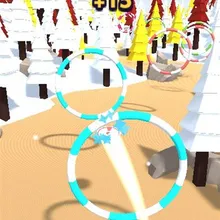
Disc Golf is a 3D frisbee golf game set on a woodland course full of pine trees, rocks and coloured hoops. A power arrow swings across a rainbow meter in front of your thrower: tap when it points at the green and the disc sails all the way to the chain basket at the far end of the fairway. Tap too early or too late and it falls short.
Once the disc is in the air you steer it. Slide your finger left and right to curve it around the trees and through the hoops that mark the route. Every hoop you fly through is worth 15 extra coins and adds to a combo, but clip the rim of a hoop or hit a tree and the throw is over. Every hole sets the hoops out differently, with more of them as you go, hoops that slide from side to side from level 5 and smaller hoops from level 8, while the power arrow speeds up a little. The park changes every three holes, from Meadow Park and Sunset Hill to Autumn Woods, Winter Park, Canyon Course, Moonlight Round, Pine Forest and Neon Nights, and your disc leaves a glowing ribbon in its own colour.
Coins buy seven disc colours, from Sunburst and Ocean to Gold and Midnight, and three upgrades: Aim Guide widens the perfect zone, Steady Hand slows the arrow down and Coin Bonus adds to every hole's reward. Miss a throw and you can rethrow once from the tee. Disc Golf plays on phones, tablets and computers with no download.
Disc Golf at a glance
- Genre
- Sports
- Plays on
- Phone, tablet and computer, in any modern browser
- Screen
- Portrait (made for phones; fits any screen)
- Download
- 9.9 MB, no install
- Progress
- Saved in your browser; coins are shared by every TinyJar game
- Price
- Free (optional one-time Remove Ads)
- Updated
- 1 November 2026
How to play Disc Golf
- Tap to start. A power arrow swings over the colour meter above your player.
- Tap when the arrow points at the green in the middle to throw the disc all the way to the basket.
- While the disc flies, slide left or right to steer it around the trees and through the hoops.
- Land the disc in the chain basket to finish the hole and collect your coins.
Controls
- Computer
- Click to throw when the arrow is on the green, then hold the mouse button and move left or right to steer the disc.
- Phone and tablet
- Tap to throw when the arrow is on the green, then slide your finger left or right to steer the disc.
Tips
- Watch the arrow swing a couple of times before you tap. Any colour other than the green sends the disc short.
- Steer with small slides. The disc keeps drifting after you let go, so a big swipe sends it into the trees.
- The hoops show a safe line between the trees, and each one you fly through pays 15 coins.
- Steady Hand is worth buying early on: the arrow speeds up every level and the upgrade slows it back down.
Featured in
Frequently asked questions
Is Disc Golf free?
Yes. Disc Golf is free to play in your browser on TinyJar Games, with no download or account needed.
Can I play Disc Golf on my phone?
Yes. It works in the browser on Android phones, iPhones and tablets, as well as on Windows, Mac and Chromebook computers. You only need one finger.
Does my progress save?
Yes. Your level, coins, disc colours and upgrades are saved in your browser on this device. Coins are shared by every game on TinyJar Games.
What can I buy with coins?
Seven disc colours (Sunburst, Lime, Ocean, Grape, Hot Pink, Gold and Midnight) and three upgrades: Aim Guide, Steady Hand and Coin Bonus. Open the shop with the cart button at the top of the game.
How many holes are there?
There is no last hole. Every hole lays out the hoops differently, adds more of them and brings in sliding and smaller hoops, and the park changes every three holes.
How do I get the disc in the basket?
Throw with the arrow on the green so the disc has the power to reach the basket, then steer it through the hoops and around the trees on the way. If you miss, you can rethrow once from the tee.